
PrivateSolutions

Fecurity

Fecurity Rob Run

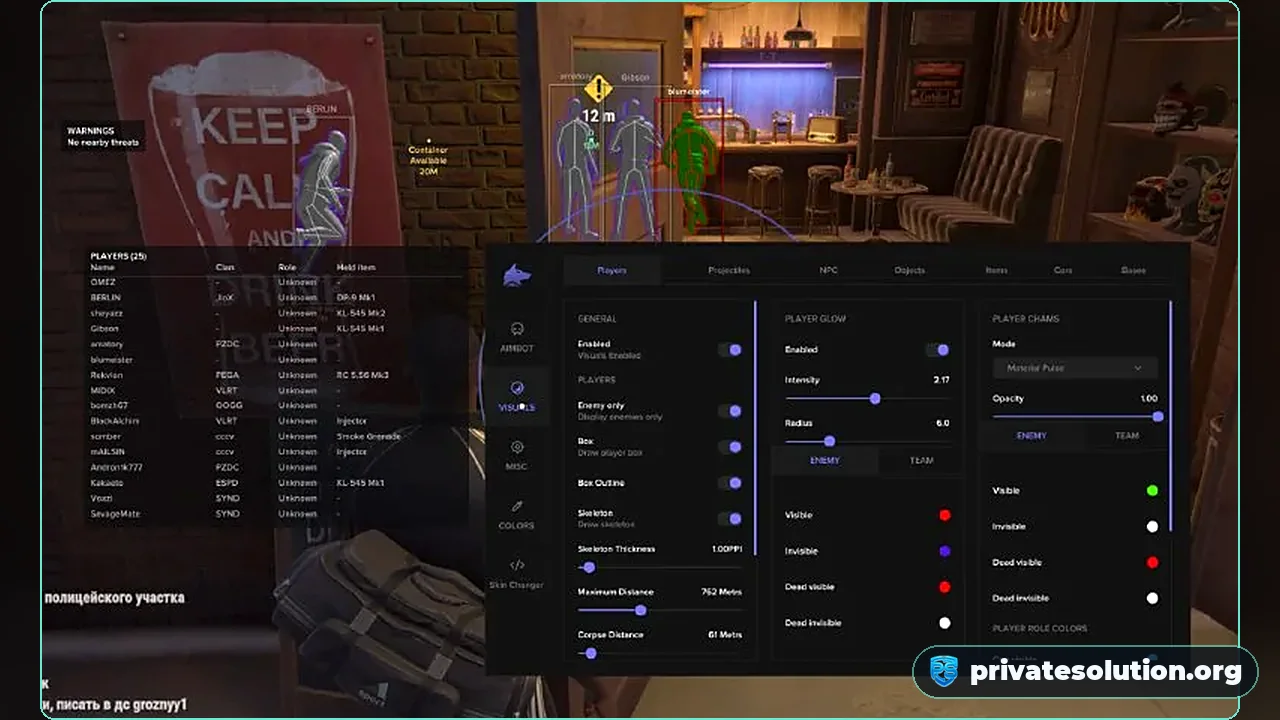
Fecurity's software for Rob Run: aim assist with vectored or silent aim, movement and spread prediction, player ESP with role colors, glow and chams, NPC, object, loot, car and base ESP, a triggerbot, radar and game map, a HUD with warnings, free camera and a skin changer. 256 features.

  • From $4.00
  • ESP, Aim, Radar, Trigger
  • Card or crypto
  • Key by email

Fecurity Rob Run plans and prices

Prices and stock can change. The live store always shows the current price before you pay. Features checked against Fecurity's own page on 2026-11-19. Open the live store · Product status

Fecurity Rob Run features: ESP, Aim, Radar and Trigger

AIM ASSIST

  • Enabled: master switch for aim assistance
  • Vectored Aim: turns the camera toward the selected target
  • Silent Aim: changes the shot direction while keeping the camera direction unchanged
  • Movement prediction: leads moving targets using their measured velocity and the age of their displayed position
  • Spread prediction: compensates for predicted weapon spread when using Vectored Aim
  • No Spread (Silent Aim): compensates for predicted single-ray spread, including steady movement on the ground; transitional states may be skipped
  • At Shoot: also activates aiming while the fire button is held
  • Visible Only: selects aim points with a clear line of sight
  • Enemy Only: excludes teammates, including party and clan members
  • Vertical Aim Speed: separate vertical aiming speed for Vectored Aim
  • Horizontal Aim Speed: separate horizontal aiming speed for Vectored Aim
  • FOV: limits the target search angle relative to the current view direction
  • Draw FOV: displays the aiming field-of-view circle
  • Target Switch Delay: delay before switching from the current valid target to another
  • Nearest Coefficient: adjusts how body-part priorities affect aim-point selection
  • Maximum Distance: limits aiming distance, also respecting the current weapon's range
  • Ignore Knocked: excludes knocked-down players
  • Include NPCs: allows aiming at NPCs
  • Aim Keys: two configurable hold keys for activation
  • Toggle Key: a separate key for toggling Aim Assist on and off
  • Hitbox Priority Key: gives greater weight to the selected hitbox priorities while held
  • Hitbox Priorities: separate priorities for the head, neck, torso, both arms and both legs; unwanted areas can be excluded
  • Hand Aim Point: adjusts aim points on the final arm bones to improve hit registration

PLAYERS ESP

  • Visuals Enabled: master switch for visual features
  • Enemy Only: displays enemies only; party and clan members are treated as teammates
  • Box: a 2D box around the player
  • Box Outline: an additional outline around the box
  • Skeleton: displays the player's skeleton
  • Skeleton Thickness: adjusts skeleton line thickness
  • Maximum Distance: limits player display distance
  • Maximum Corpse Distance: a separate maximum display distance for dead players
  • Corpses ESP: displays dead players when model data is available
  • Nickname: displays the player's nickname
  • Distance: displays the distance to the player
  • Held Item: displays the name of the weapon or other item in the player's hands
  • Aiming at You: a blinking tag above a player who is aiming at you
  • Reloading Tag: a blinking reload tag beside the held-item name
  • Role Visibility Colors: separate visible and hidden colors for cops, robbers and civilians
  • Enemy / Team ESP Colors: separate box, skeleton and label colors for enemies and teammates, including visibility and death states

PLAYERS GLOW

  • Glow: an outline glow around the player model
  • Glow Intensity: adjusts glow intensity
  • Glow Radius: adjusts glow width
  • ENEMY / TEAM: separate enemy and teammate color tabs
  • Glow State Colors: separate Visible, Invisible, Dead Visible and Dead Invisible colors for each team category

PLAYERS CHAMS

  • Chams Mode: choose Disabled, Flat, Material, Flat Pulse or Material Pulse
  • Flat Chams: a flat color fill on the model
  • Material Chams: a shaded fill that gives the model's surface depth
  • Flat Pulse: a flat fill with pulsing model edges
  • Material Pulse: a shaded material with pulsing model edges
  • Chams Opacity: adjusts fill opacity
  • ENEMY / TEAM: separate enemy and teammate color tabs
  • Chams State Colors: separate Visible, Invisible, Dead Visible and Dead Invisible colors for each team category
  • Combined Glow / Chams: allows Glow and Chams to be used together

PROJECTILES ESP

  • Projectile ESP: displays grenades in a dedicated Visuals subtab
  • Show Name: displays grenade names
  • Grenade Trajectory: displays the path a grenade has already traveled
  • Throw Preview: displays the game's active throw-preview trajectory, including its collision result
  • Bullet Tracers: short-lived, fading lines for your own and other players' shots
  • Grenades Maximum Distance: a separate maximum display distance for grenades
  • Tracers Maximum Distance: a separate maximum display distance for bullet tracers

NPC ESP

  • NPC ESP: displays in-game NPCs
  • Show Name: displays the NPC's name or type
  • Show Distance: displays the distance to the NPC
  • Guards: displays guards with a separate distance limit
  • Traders: displays traders with a separate distance limit
  • Bots / Police: displays bots and police with a separate distance limit
  • Show State: displays available NPC states: idle, suspicious, alerted, preparing a call, calling, hands raised or dead
  • Cops Call Timer: displays the time remaining while a guard is calling the police
  • Show Dead: displays dead NPCs

OBJECTS ESP

  • Objects ESP: displays world objects
  • Show Name: displays object labels
  • Show Distance: displays the distance to objects
  • Show State: displays available information about contents, charging, availability and object state
  • Hide Empty: hides objects confirmed to be empty
  • Bag Contents: displays bag contents with item quantities
  • Trunk Contents: displays vehicle trunk contents with item quantities
  • Loot Nodes: displays loot nodes
  • Cargo: displays cargo
  • Cash Chargers: displays cash chargers and their state
  • Cash Nodes: displays cash nodes and their available amounts when data is available
  • Player Bags: displays player bags, including the owner's name when available
  • Vehicle Trunks: displays vehicle trunks
  • Security Panels: displays security panels, their hacking state and the associated alarm state
  • Doors: displays doors and their state
  • Safe Doors: displays safe doors, their lock state and transitional states
  • Containers: displays containers and whether they are empty
  • Hide Spots: displays hiding spots and whether they are free or occupied
  • Object Colors: an individual color for each object category
  • Object Maximum Distances: a separate maximum display distance for each object category

ITEMS ESP

  • Items ESP: displays loot items
  • Show Name: displays item names
  • Show Distance: displays the distance to items
  • Item Count: displays item quantities as xN
  • Hide Empty: hides emptied or looted loot objects
  • Show Unrated: separately displays items with no identified rarity
  • Loot Display: By Category: filters loot by item type
  • Weapons: weapons
  • Ammo: ammunition
  • Equipment: equipment
  • Medicine: medical items
  • Grenades: grenades
  • Valuables: valuables
  • Keys / Tools: keys and tools
  • Cash: cash
  • Other: other items
  • Category Maximum Distances: a separate distance limit for each item type
  • Loot Display: By Rarity: filters loot by rarity
  • Common / Uncommon / Rare / Epic / Legendary / Exotic: individual visibility switches for each rarity
  • Rarity Colors: an individual color for each rarity
  • Rarity Maximum Distances: a separate distance limit for each rarity
  • Unrated Maximum Distance: a separate display distance for items with no identified rarity

CARS ESP

  • Cars ESP: displays cars
  • Show Name: displays the car's in-game localized name when available
  • Show Distance: displays the distance to the car
  • Maximum Distance: maximum display distance for car ESP
  • Box Mode: choose None, 2D or 3D
  • 2D Box: a screen-space box around the car's bounds
  • 3D Box: a 3D wireframe box based on the car's dimensions and orientation
  • Owner Filters: separate visibility switches for cars owned by cops, robbers or civilians, and for unowned cars
  • Shared Vehicle Filters: the selected owner filters also apply to Radar and Game Map

BASES ESP

  • Bases ESP: displays available settlement bases without a separate distance limit
  • Owner: displays the base owner's name
  • Clan: displays the clan tag and name
  • Buildings: displays the main building, fence and outbuildings
  • Building Names: localized building labels when a translation is available
  • Base State: displays whether the base is locked, under construction or being moved
  • Distance: displays the distance to the base
  • Bases List: a separate panel listing bases, owners, distances and raid states
  • Transparency: adjusts the transparency of base information
  • Raid State: displays buildings under raid and the raid lock timer
  • Defense Blocks / Modules: displays defense blocks, installed modules and defense points
  • Open Doors: displays the number of open doors among the building's known doors
  • VIP: displays VIP status and remaining time
  • Workbenches: displays equipment for money laundering, cargo opening and exchange, production, cargo charging and crypto farming
  • Facility State: displays whether equipment is working or idle, along with timers, cargo quantities and readiness
  • Money Laundering Info: displays dirty and clean cash amounts, activity and cable status
  • Storages / Containers: displays how full the base's storages and containers are
  • Building Loot: displays cargo left in buildings
  • Facility Contents: displays available item and cargo lists inside equipment
  • Base Door Warning: warns about unclosed doors at your own base, with distance and a direction indicator; works independently of the main HUD switch
  • Base Colors: separate colors for your own base, clan bases and other bases

WEAPON

  • Invisible Opacity: adjusts the opacity of hidden ESP objects
  • No-Recoil: disables weapon recoil
  • Auto Pistol: fires semi-automatic pistols automatically while the fire button is held

TRIGGERBOT

  • Triggerbot: fires automatically when the crosshair is on a valid target
  • Activation Key: a configurable activation key
  • Activation Mode: hold, toggle or always active
  • Settings Mode: use global settings or separate weapon profiles
  • Weapon Profiles: Global, Pistol, Automatic and Other profiles
  • Override Global: overrides global settings for the selected weapon group
  • Hitboxes: selects the head, torso and legs
  • Reaction Delay: reaction delay before firing
  • Click Hold: how long the fire button is held down
  • Click Interval: the interval between button presses
  • Hitbox Scale: adjusts the size of the area checked for triggering
  • Maximum Distance: limits the distance to the target
  • Target Roles: separate switches for cops, robbers and civilians
  • Enemy Only: excludes teammates, including party and clan members; available in each profile
  • Visible Only: triggers only on visible targets
  • Ignore Dead: ignores dead players
  • Ignore Knocked: ignores knocked-down players
  • Ignore in Vehicle: ignores players in vehicles

RADAR AND GAME MAP

  • Radar: a separate on-screen radar
  • Rotate with Camera: rotates the radar with the camera
  • Radar Names / Distance: displays names and distances on the radar
  • Radar Range: radar detection range
  • Radar Size / Position: radar size and screen position
  • Radar Opacity: radar opacity
  • Game Map: adds markers to the game's own maps
  • Minimap: displays markers on the minimap
  • Big Map: displays markers on the big map, following its zoom and panning
  • Map Names / Distance: displays names and distances on the game map
  • Map Opacity: opacity of game-map markers
  • Marker Size: adjusts marker size
  • Look Direction: displays look direction
  • Marker Outline: outlines markers
  • Edge Markers: displays target indicators at the map's edge
  • Marker Categories: players, NPCs, bases, cars and surveillance cameras
  • Player Role Filters: cops, robbers and civilians
  • Show Broken Cameras: displays broken surveillance cameras
  • Show Dead: displays dead characters on the map and radar
  • Show Teammates: displays teammates, including party and clan members
  • Category Maximum Distances: separate distance limits for players, NPCs, bases, cars and cameras
  • Role Colors: separate colors for cops, robbers and civilians
  • Object Marker Colors: separate colors for NPCs, cars, cameras, bases and unknown targets
  • Teammate Color: a separate color for teammates
  • Aiming at You Color: highlights players who are aiming at you
  • Vehicle Owner Filters: car-owner filters from Cars ESP also apply to the map and radar

HUD AND WARNINGS

  • HUD: a movable information panel
  • Police Approaching: warns about approaching police, showing their count, distance and direction
  • Police Maximum Distance: limits the range of police warnings
  • Aiming at You: warns about a player who is aiming at you, showing their name, distance and direction
  • Pop-up Notifications: pop-up alerts for approaching police and players aiming at you
  • Base Doors: a separate warning for unclosed house doors, fence gates and garage gates at your own base
  • Base Door Direction: displays direction, distance and the number of known open doors; works even when HUD is disabled
  • HUD Offsets: horizontal and vertical widget offsets
  • HUD Scale: adjusts widget scale
  • HUD Background: adjusts background opacity
  • Widget Dragging: drag the HUD and base warning with the mouse while the menu is open

PLAYER LIST

  • Player List: a movable table of players on the server
  • Distant Players: unloaded players remain listed with their available names and IDs
  • Column Selection: choose name, clan, role, distance, held item, state and ID columns
  • Sorting: sorts by distance, name or role
  • Maximum Rows: sets the maximum number of rows
  • Role Colors: colors rows by player role
  • Threat Highlight: highlights players aiming at you in red
  • Scale / Background: table scale and background opacity
  • Dragging: drag the table with the mouse while the menu is open

BATTLE MODE

  • Battle Mode: quickly switches to a reduced display for combat
  • Activation Key: a configurable activation key
  • Activation Mode: toggle or hold
  • Auto Enable: activates automatically when someone aims at you or police approach
  • Auto Disable After: deactivates after a set time once the threat is gone
  • Skeleton Only: displays players as skeletons only in Battle Mode
  • Visible Only: displays only visible players in Battle Mode
  • Limit Distance: a separate player distance limit for Battle Mode
  • Hide Knocked: hides knocked-down players
  • Hide Team: hides teammates, including party and clan members
  • Hide Game Map: hides the map and radar during combat
  • Hide HUD: hides the HUD during combat
  • Hide Player List: hides the player list during combat
  • Hide Glow: disables Glow during combat
  • Hide Aim FOV: hides the FOV circle during combat

FREE CAMERA

  • Free Camera Enabled: allows Free Camera to be used
  • Toggle Key: independently activates and deactivates the camera; defaults to F7 and does not change the Enabled checkbox
  • Mouse Look: controls the view with the mouse
  • WASD Movement: moves the camera with the standard movement keys
  • Vertical Movement: moves up with Space and down with Ctrl
  • Speed Boost: speeds up the camera while Shift is held
  • Movement Speed: adjusts base movement speed
  • Mouse Sensitivity: adjusts look sensitivity
  • Boost Multiplier: adjusts the speed-boost multiplier
  • Player Input Block: blocks normal character controls while Free Camera is active
  • Camera Restore: restores normal camera and character controls when Free Camera is deactivated

OVERLAY AND INTERFACE

  • Screen Protection: hides the overlay from supported screen-capture methods
  • V-Sync: vertical synchronization for the overlay
  • FPS No Limit: removes the overlay frame-rate limit
  • Frame Limit: sets the overlay FPS limit
  • Distance Unit: selects the units used to display distances
  • Menu Key: a configurable key for opening the menu
  • Interface Scale: adjusts interface scale
  • Interface Colors: adjusts colors for menu borders, text, descriptions, backgrounds and control states
  • Color Templates: preset color swatches for quick selection

SKIN CHANGER

  • Enabled: master switch for local appearance changes
  • Weapon Skins: applies compatible skins to the weapon in your hands
  • Weapon Skin Selection: selects a skin from the list for the current weapon
  • Clothing Skins: changes the local character's clothing appearance
  • Male Outfit: a separate selection for the male outfit
  • Female Outfit: a separate selection for the female outfit
  • Car Skins: applies compatible materials and appearances to cars
  • Car Appearance Selection: selects compatible appearances for the current car; your own cars are considered when you are on foot
  • Compatibility Filter: lists skins compatible with the selected weapon or car
  • Localized Names: uses in-game names for clothing, skins and cars when localization is available
  • Default: restores the default appearance
  • Independent Categories: weapons, clothing and cars can be enabled separately
  • Client-side Appearance: appearance changes are applied on the client side

About Rob Run

Rob Run is Kefir's multiplayer crime sandbox for Windows, released on Steam on November 4, 2026. Every cop and criminal in it is a real player. You can rob banks, build a hideout or fight for territory against cops and rival organizations, and start a crime family or join a clan.

How Fecurity Rob Run works

Fecurity Rob Run runs on the same PC as Rob Run, so you need no DMA card and no second PC. After payment you get your Fecurity key: our Fecurity setup guide shows how to get the loader, run it and enter your key, then you set everything up in the menu.

Fecurity setup guide: every step from your key to playing.

What you need

All PC software · External vs internal · Product status

Other Rob Run options

Compare Fecurity Rob Run with every other Rob Run product we sell:

All Rob Run licenses · Rob Run DMA guide · Product status

Fecurity Rob Run questions

How much does Fecurity Rob Run cost?

1 day: $4.00, 7 days: $15.00, 30 days: $30.00. Prices start at $4.00.

What features does Fecurity Rob Run have?

Fecurity's software for Rob Run: aim assist with vectored or silent aim, movement and spread prediction, player ESP with role colors, glow and chams, NPC, object, loot, car and base ESP, a triggerbot, radar and game map, a HUD with warnings, free camera and a skin changer. 256 features. In short: ESP, aim, radar and trigger features. Its feature list covers Aim Assist, Players ESP, Players Glow, Players Chams, Projectiles ESP, NPC ESP, Objects ESP, Items ESP, Cars ESP, Bases ESP, Weapon, Triggerbot, Radar and Game Map, HUD and Warnings, Player List, Battle Mode, Free Camera, Overlay and Interface and Skin Changer, all on this page.

Is Fecurity Rob Run working right now?

Yes, Fecurity lists it as available today. After big game updates a product can pause for a while; the Product status page shows the latest.

What do I need for Fecurity Rob Run?

Runs on your gaming PC: no DMA card or second PC needed. Windows 10 or 11. Your key is emailed after payment and shown under My keys. Our Fecurity setup guide walks you through every step: privatesolution.org/fecurity/setup/.

What happens when Rob Run updates?

Fecurity updates the software after game patches. While it is being updated the Product status page shows it as updating, and your key keeps running as normal.

Can I try Fecurity Rob Run first?

Yes. The 1 day key costs $4.00, so you can try it before a longer plan.

Does Fecurity Rob Run work on PS5 or Xbox?

No. It runs on Windows PCs only.

Can I pay by card?

Yes. Card, Apple Pay and Google Pay through Stripe, or crypto, at checkout. PayPal works in a Discord ticket.

How do I get my Fecurity Rob Run key?

Pay by card or crypto at checkout. Your key is sent by email and shows on your My orders page.

Can I get a refund?

Keys cannot be refunded once they are activated. If a key we send will not activate, open a Discord ticket and we replace it.

Rob Run: ESP, radar and more

More Fecurity