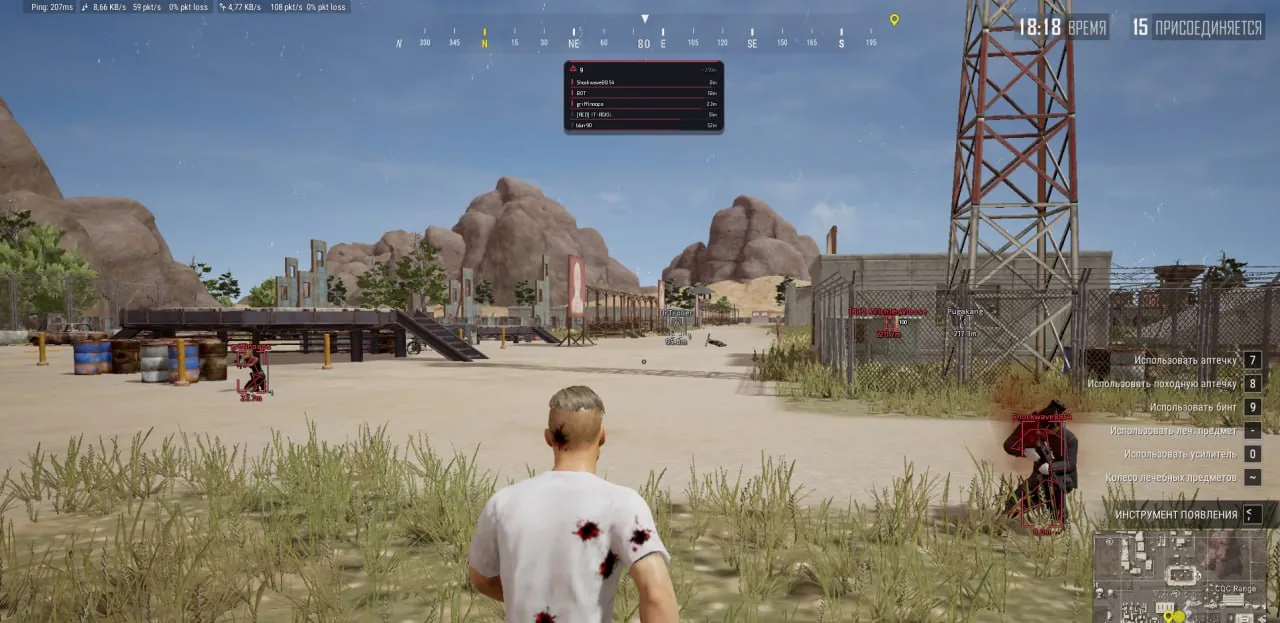
The light build of Bleak PUBG for PUBG on Steam: player boxes, skeletons, names, distance and health, kills and damage, and a panel of the five closest enemies. No aimbot, loot ESP or radar.
Prices and stock can change. The live store always shows the current price before you pay. Features checked against Bleak's own page on 2026-11-19. Open the live store · Product status
Bleak PUBG Lite features: ESP, Aim and Radar
VISUALS
Box Type: Select the type of box displayed around the target: Full, Corner, 3D Box or None
Names: Displays player nicknames above players' heads
Skeleton: Enables display of the enemy's skeleton. Self-calibrating: after game updates the leg bones are re-matched automatically, no waiting for a fix
Head circle: A compact head marker (a volumetric "hat" cone) instead of the full skeleton - minimal visual noise
Bone Thick: Slider for adjusting the thickness of the skeleton lines (1-5)
Distance: Displays the distance to the target in meters
Draw range: Player rendering range in meters (0-1000; 0 = no limit). Near the range border the ESP smoothly fades out and the text shrinks - the picture stays clean. More distant enemies are not rendered and do not load the reading channel
Health: Enables the health bar (a vertical bar to the right of the box, with a white "ghost" of the last damage dealt)
Visible Check: ESP visibility check: on - players are split into "visible / not visible" with separate colors, off - everyone is drawn in one color
Kills: Shows the player's kill count in the current match next to the box (K)
Player info: Shows additional information: damage dealt (DMG) next to the box and the survival level (LV) under the nickname
Weapon: Weapon in hands: shows the name of the weapon the player is holding, as a line under the box
Ammo: Ammo in mag: shows the ammo of the held weapon next to the name, "AKM [27]". The bracket color is set by the swatch right on the toggle
Danger warning: Warning panel about nearby enemies: a counter of enemies within 200m and a list of the 5 closest ones (name, distance bar, K/DMG). In the Lite build the panel sits top-center
Knocked: Knocked-down players are highlighted with a dedicated color across all ESP elements - you instantly see who to finish off
Preview: Live preview of your configured ESP right in the menu (box, skeleton, name, level, distance, health bar)
PALETTE
Color 2D Box: Color of the box around the enemy
Box (not visible): Box color for the "not visible" rendering variant
Color Bone: Color of the skeleton lines
Skeleton (not visible): Skeleton color for the "not visible" variant
Color Name: Player nickname color
Name (not visible): Name color for the "not visible" variant
Color Distance: Distance text color
INTERFACE
Menu color: Menu accent (theme) color
Menu background animation: Animated wave background of the menu. Can be turned off - convenient for screenshots and video recording
Overlay FPS limit: Overlay FPS limit (0-360): raise it for smoother ESP
Watermark: On-screen watermark
ESP font: ESP text font: Pixel (default) / Minecraft / Exo2. Applied instantly, no re-injection needed
ESP font size: ESP font size in pixels (6-18; the range depends on the selected font)
Language: Menu language: English / Русский (all menu items and item names are translated)
Auto-exit: When the game (TslGame.exe) closes, the software shuts down completely along with it: the overlay disappears and the Discord process closes. No active traces of the software remain on the PC
Search: Search bar across all menu functions (in the header)
INSERT: Open / close the menu
CONFIG
Input Name: Enter a name for your new configuration file (the Lite build name is pre-filled by default - blk_lite)
Create New: Create and save a new configuration file with the entered name
Save Selected: Overwrite the configuration with the typed name using the current menu settings
Load Selected: Load settings from the configuration file selected in the list (applies them to the current session)
Rename: Rename an existing configuration file selected in the list
Delete: Permanently delete the selected configuration file
Refresh List: Force a refresh of the configuration list (useful if files were transferred manually)
Config list: Shows all saved configurations; the applied one is marked with an ACTIVE badge, and a double click on a row instantly loads it. The last active configuration is picked up automatically on the next launch
HOW IT RUNS
The light build of Bleak PUBG for PUBG on Steam (not the separate PUBG Lite game): player ESP, no aimbot, loot or radar
Runs on your gaming PC through the Discord overlay: no DMA card or second PC
Windows 10 and 11 (2004 to 26H1)
Works with Secure Boot on
About PUBG: Battlegrounds
PUBG: Battlegrounds is KRAFTON's battle royale, free to play since 2022. Up to 100 players parachute onto a large map, loot weapons and vehicles, and fight inside a shrinking zone until one player or squad is left.
How Bleak PUBG Lite works
Bleak PUBG Lite runs on the same PC as PUBG: Battlegrounds, through the Discord overlay, so you need no DMA card and no second PC. After payment you get your Bleak key: our Bleak setup guide shows how to get the loader, run it and enter your key, then you set everything up in the menu.
The light build of Bleak PUBG for PUBG on Steam: player boxes, skeletons, names, distance and health, kills and damage, and a panel of the five closest enemies. No aimbot, loot ESP or radar. In short: ESP, aim and radar features. Its feature list covers Visuals, Palette, Interface, Config and How It Runs, all on this page.
Is Bleak PUBG Lite working right now?
Yes, Bleak lists it as available today. After big game updates a product can pause for a while; the Product status page shows the latest.
What do I need for Bleak PUBG Lite?
Runs on your gaming PC: no DMA card or second PC needed. Windows 10 or 11, with the Discord overlay turned on. Your key is emailed after payment and shown under My keys. Our Bleak setup guide walks you through every step: privatesolution.org/bleak/setup/.
What happens when PUBG: Battlegrounds updates?
Bleak updates the software after game patches. While it is being updated the Product status page shows it as updating, and your key keeps running as normal.
Can I try Bleak PUBG Lite first?
Yes. The 1 day key costs $2.99, so you can try it before a longer plan.
Does Bleak PUBG Lite work on PS5 or Xbox?
No. It runs on Windows PCs only.
Can I pay by card?
Yes. Card, Apple Pay and Google Pay through Stripe, or crypto, at checkout. PayPal works in a Discord ticket.
How do I get my Bleak PUBG Lite key?
Pay by card or crypto at checkout. Your key is sent by email and shows on your My orders page.
Can I get a refund?
Keys cannot be refunded once they are activated. If a key we send will not activate, open a Discord ticket and we replace it.